

Learning how to organize your website is the next step to building a website!
Previously, I wrote an introduction to this Web Design Series with the Simple Roadmap that I follow when I create websites for my clients. And for the most part, we are going to stick with the order that I go through while I am creating websites for my clients. If you haven’t read it, go check it out and see what is in store for you all. In this blog post, we’re going to cover what I do before I enter the writing process: organizing the website.
Overview of Organizing Your Website
- Questions to ask yourself when choosing components and elements of the website, webpage layout and overall organization of the website
- List of pages for a website
- Organizing the website and what to think about when you’re deciding on desktop management (this is a rhetorical term that I will explain laters)
- Examples of what I have done for clients
- Downloadable worksheet at the bottom
Questions to Ask Yourself When Organizing Your Website
Before I start the writing phase (which is my favorite part), I spend some time brainstorming all the important pieces to the overall layout of the website and the relevant content for the business. I consider webpages and what they would be, widgets, and the arrangement of all of that jazz. Here is a quick list of things to ask yourself when you start making the skeleton of your website.
- How many pages is appropriate or relevant for the Menu? 3? 5? 12? Truthfully, You can have as many pages as you want- there are over 20 for The MWF, but not all of them are in the Menu or even the Main Menu (the one you see first). I have run into a situation or two when I have seen a website with 30 web pages and almost all of them were in the menu….not pretty.
- Which pages are those going to be in your Main Menu and Sub-Menus? (see below)
- Is a blog relevant for this particular business? Sometimes it is good to persuade your audience/potential customer with ‘free’ information- show them the value of you/your business and how they can receive more value from you as a paying customer
- Does the client want biographies on the website? If so, does the client want multiple pages or a single page of the entire team?
Then I consider which order/hierarchy the pages need to be in (either left to right, or top to bottom). Obviously Home/About pages are #1, followed by Services, Blog (if applicable) and the Contact page. The rest of the menu depends on the priority of those pages. When I choose the order of menus, I considered what items would be of most interest to the website visitor/potential customer (which is also changes based on the type of industry), and then the order in which I should prioritize the menu items (as in, what order should I tell the reader to follow).
Organizing Your Website Layout
There is a rhetorical technique called desktop management**: it is a writer’s act and/or design to aid readers in remembering and prioritizing information that has been written in a text. To a certain extent, it is your responsibility to direct the reader to the most important information and manage how they remember the information.
This is easily adaptable when you consider the layout (AKA the skeleton) of your website and menus. The visual component is just as important as the reading… You get decide how the menu and content on the webpages are going to be organized based on priority and how you want readers/customers to learn about your business. You are choosing how to steer your reader through your website pages and the menu.
Questions to Ask Yourself
- How are you going to organize the information on your website for your reader?
- After the Home/About page, what is the next most important webpage?
- On the page itself- Will you be using headings/subheadings, or graphics instead of only text? (more later)
- On the page itself- Will you bold or italicize specific pieces of information; if so, what is that going to be? (more later)
- On the page itself- Will you use bullet points or numbered lists? (more later)
- How many places will you make your contact information available to your website visitors? 1 page, everywhere, a widget on the side or at the footer of your site?
Tip: I don’t think there is such thing as too many access points to your Contact page or signup form. As long as you make it look presentable and not too messy (ie. a full form at the bottom or middle of every page) it’ll look fine. Simply the words Contact Me or a button that says Contact, or Request an Estimate will suffice.
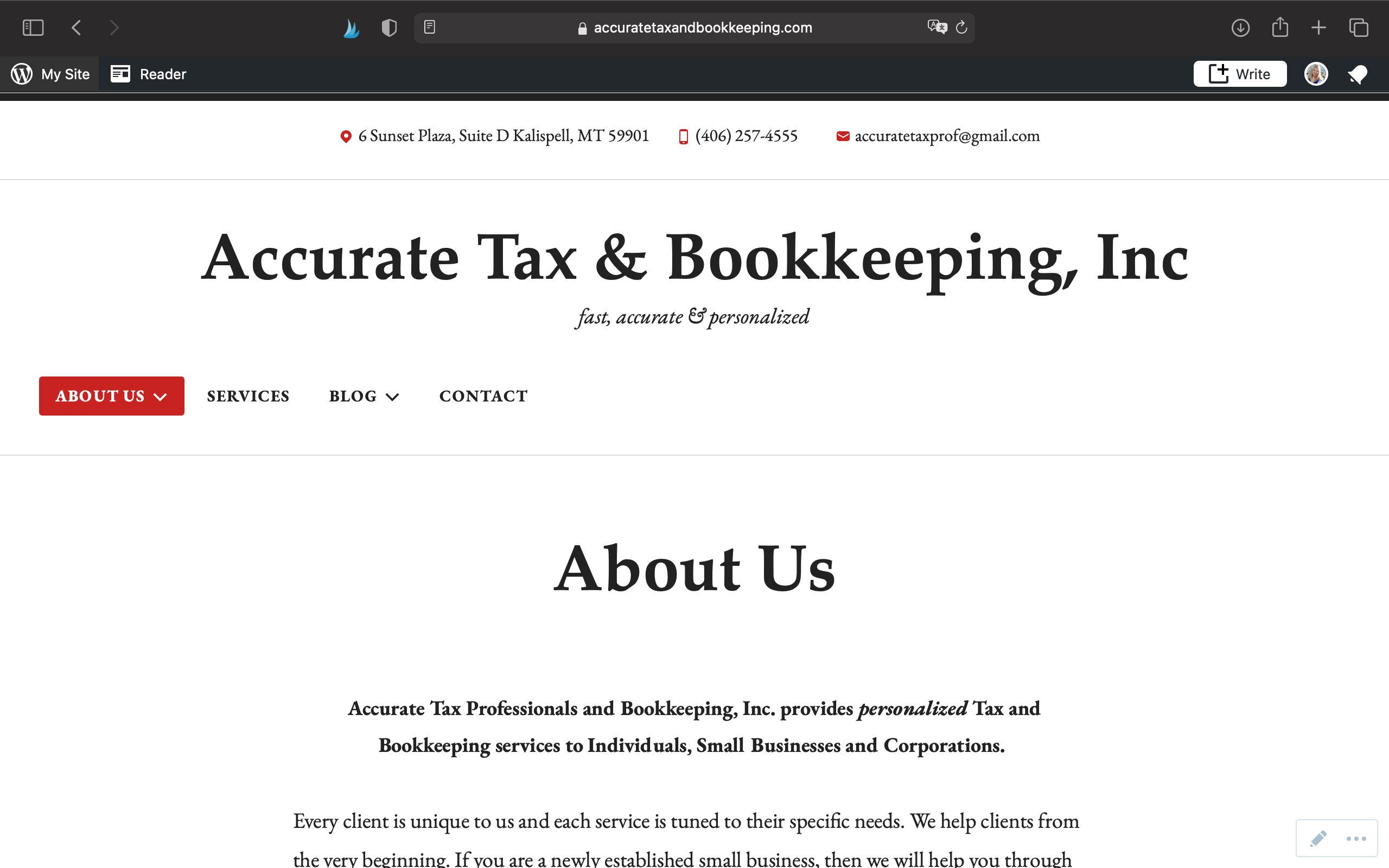
Example: Accurate Tax Professionals & Bookkeeping (left to right of Menu)
This is a very simple example because it is a very straightforward type business. There doesn’t need to be more than a description of what this business is and what makes it standout, a page detailing their services, a blog for continued education (because it is one of the company’s values), and contact page.
Example: HazyLu (from top to bottom of Menu):
HazyLu is a small business that sells vintage jewelry as versatile magnet pieces. They can be used as fridge magnets, wine glass charms, interchangeable napkin ring jewels, etc. This menu needed more thought into it because of the following:

Showcasing the product is most important for this type of e-commerce business. People need to see how beautiful and versatile her products are. Each image in the carrousel led to that category from her Shop if you clicked on the image. Then if a customer wanted to go straight to all her products, they click on Collection. If they wanted to see her products as themes (nautical, Boho, animal print), they can click on the drop down menu option. And then Customized Pieces as its own section. (1) Visually showing products, (2) the shop itself, and (3) learning about custom pieces is all more important than the company’s history, blog and special offers so my priorities were broken into 2 pieces (high/low) and which information was most important for her business. While learning about her journey to establishing this business is quite amazing and interesting, having access to the Shop’s inventory ASAP might be more important to the customer and the website needs to anticipate a website user’s needs/wants.
What Kind of Pages Can be on a Website?
- Home/About the Business page
- Services
- This could turn into more than 1 page too if you offer different kinds of services/offers that need individual attention.
- Contact
- Blog
- Team Biographies
- Portfolio/Galleries
- Products/Shop
- Frequently Asked Questions
- Product Descriptions- features and components of what you sell, if you primarily sell 1 thing.
- Or multiple pages of the sort if you offer a product that has a purpose. 1 page describing the product, the other describing how you can use it. For example, 1 of my past clients sold geodesic domes so that their customers could use them for VRBOs. The client sells the dome and manages the AirBnb side of the business as well. So I created 2 pages for it.
- Special Offers
- Major Campaigns (example: we’re doing a Year of Service for The Montana Woman Foundation, it has its own page and totally belongs in the Menu!)
- Signup for email list
Final Thoughts on Organizing Your Website
Now that we’ve reached the end of the article, I hope you have learned a thing or two about organizing your site and getting read for the writing web copy phase.
- Anticipate your website user’s wants and needs and organize your website content (Menu skeleton, widgets and the content on the web page) accordingly. (We will talk more about organizing webpage content later in the writing phase)
- Use desktop management to direct your website user’s wants and needs (ie prioritize your information)
- You can have as many pages as you want on the website but it doesn’t mean it all has to be in the Main Menu.
- Organizing your content does more than steer your readers/visitors. It serves as a guide for yourself so that you can better refine your brand and ultimate Style. (PS- Style is going to be another subject later in the series!)
Get this worksheet of all the questions I asked in this blog post and the list of possible web pages so that you have everything in 1 place.
Purchase my Figure Out Content Writing Workbook for $20. There are 30+ questions to help you get on tracking for the writing process of building your website and developing standout web copy.
Be sure to subscribe to this blog so that you don’t miss a step when it comes to this Web Design series and future posts!
Don’t Forget to Pin these Images! ⬇️⬇️⬇️
Special Notes-
- ** To paraphrase Janet Giltrow’s Academic Writing, pg 185
 Katherine MC Johnson
[…] that could be simply 1. About 2. Contact/Contact Form 3. Services If you want to read more about How to Organize Your Website, read this […]
LikeLike
[…] that up for the readers. If you’re a returning reader, you may recall that it helps with desktop management as well! It is your responsibility to shape the way your readers absorb and organize the information […]
LikeLike
[…] done writing your first draft, don’t let these suggestions get in the way. My blog post about Organizing Your Website, also has useful advice on how to better shape your writing and […]
LikeLike
[…] Organizing Your Website […]
LikeLike