Optimizing your blog or website is extremely important for anyone who wants to make their site as successful as possible. Optimizing your blog or website means that you are building, writing and designing it in a way to make it easier to be found. The world wide web has millions and millions of ‘stuff’ on it, and you can easily be buried by Google’s algorithms. Optimizing it makes it easier for you to pop up on search results. There are 2 ways to make your blog found online: Maximizing Readability, and ticking off all the items to improve the Search Engine Optimization checklist. These next 2 posts are going to cover these 2 things, with this post covering your SEO Analysis and a free Checklist.
The Optimizing Checklist
Key Phrase
What is a Key Phrase?
A key phrase is the way you shape and direct your blog post so that people can find you on Google/Search Engines and Pinterest. Think about how your readers or clients may be searching for someone like you and make that page very specific. For example, when I write recipes for my Tiny Twenty-Something blog, I think about what someone might be looking for: chicken recipes? Beef broth? Keto Fat Bombs? Fat Bombs? And then I make the key phrase something like fat bombs, or peanut butter fat bomb. An upcoming blog post is about the things I have learned about cooing keto, and I used “cooking keto” as my key phrase.
Key Phrase Intro
It is recommended that you not only use your key phrase as your blog post or page title, but that you start your web copy with that identifier…. Now, I somewhat disagree with this option because if you’re starting fresh on that page, you’re going to see the that key phrase as the Title, the excerpt, meta data, and the first sentence of the copy? Sounds redundant to me sometimes.
Key Phrase Length & Copy
The more specific you are about what your key phrase is, the better; and the length helps too. You don’t want something too long because you have to be thinking about What is someone going to be searching? You also want it to be short enough that you can switch things up in your web copy. This blog post has the key phrase “optimizing blog” and as you may have noticed, my blog article is titled “Optimizing Blog Post Checklist” and starts with “Optimizing your blog or website“. You might also notice later that I am using the word optimize, and adding other variations of the words to the subheadings. I have noticed that for every 130-150 words, you need to have your key phrase written exactly or similarly twice. It is also best practice that you write at least 300 words- which is why you see so many recipe blog posts out there sound like a novel with the “Jump to Recipe” option available at the top!
Adding your Key Word to your Meta-Description
Like I have said above, your key word or key phrase is all about how someone is going to find you in their search results and what they’ll be searching for in the first place in order to find you. You need to include your key phrase in your meta-description and it needs to be close to the front of your phrase. This is the information they will see when your content pops up. They need to know that it is relevant to their search. Your meta data also needs to be 120-156 characters long.
My meta-description for this blog post: Optimizing your blog is extremely important for the success of your website. Here’s how to best optimize your site for search engines.

Key Phrase in Slug
The slug for any web page or post is the ‘secondary’ content in a URL link. It’s what comes after your basic website link. The slug titles and optimizes at the same time. This post has the following link and slug: katherinemcjohnson.wordpress.com/2021/06/25/optimizing-blog-post
Subheadings & Distribution
Subheadings are a great way to break up your web copy- especially since you need to write so much. I wrote earlier that you need to write at least 300 words for a good page- it is recommended that you write as much as 1200-1500 words! And when you’re writing that much, you need to break that up for the readers. If you’re a returning reader, you may recall that it helps with desktop management as well! It is your responsibility to shape the way your readers absorb and organize the information you’re presenting. It is also another great way to utilize your key phrase without making the rest of your copy look too much like your key word.
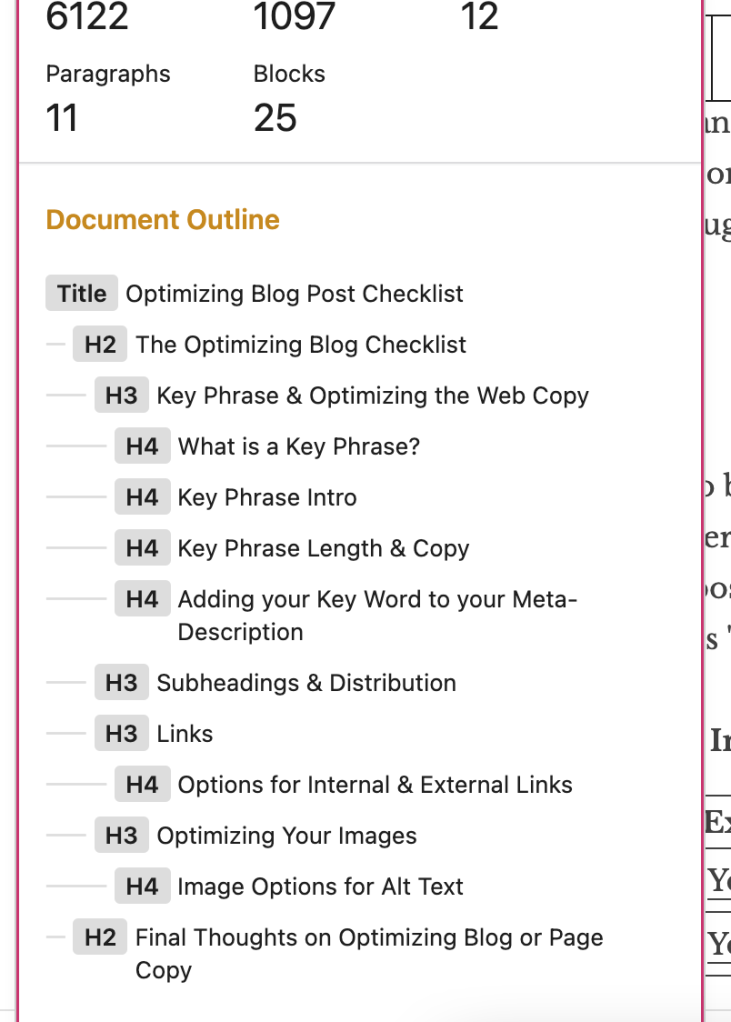
It is also really important that you don’t organize your sub headings by their size. Before learning their value, I would choose the subheading based on it’s appearance. If H3 was bigger than what I wanted for a certain block, I would go with H4 even though there was no real value to it. Everything needs to go in order. For instance, this blog post has the following outline.
Links
There are two kinds of links that you need to be utilizing in your web copy in order to fully optimize your blog: internal links and external links. Internal links are links that you insert into your web copy that will direct a reader to another page or blog post in your website. External links are links that you outbound links that lead your reader towards ‘the outside world’ of your website.
Options for Internal & External Links
| Internal Links | Externals Links |
|---|---|
| Related Blog Posts | Your Instagram Profile |
| Other Website Pages | Your Facebook Page |
| Categories (use it in a sentence and interest your reader) | Facebook Groups |
| Signup pages for freebies | Affiliate Links |
| Pinterest Profiles | |
| Other blogs | |
| Your Pinterest boards- embed the Pinterest board so they can see recent Pins! |
Optimizing Your Images
You need images in your web copy for 2 most important reasons: 1. to break up the monotony of text, 2. Use your key phrase to further optimize your post with Alt Attributes. Alt Attributes are descriptions of your images and their purpose. Sometimes they don’t have much purchase other than ‘decorations’ so you just use a version of your key phrase to optimize it and essentially make it have a purpose.
Image Options for Alt Text
- Feature Image for your blog post or web page
- Supplemental Images for your post or page
- Pins- make sure to tell your readers to pin an image, and what better way than to make something for them!?
Images in your blog posts or web pages need the key phrase or similar text to help optimize the page- but it doesn’t need to sound pretty. As you may be recognizing, your key phrase and optimizing is all about ‘recycling’ or reinforcing the information that is out there. But you need to be careful about walking the very fine line between sounding redundant and sounding informative. The images in this blog post have the following alt attributes.
- Feature Image: Optimizing Blog Post Checklist
- Document Outline: Optimizing Subheadings & Distributions
- Meta Data Image: Optimizing Meta-Description
- Pin Image: Optimize with this Checklist
Final Thoughts on Optimizing Blog or Page Copy
There is quite a lot that goes into optimizing your blog post or website. Sometimes it is exhausting. But it is also like an interesting puzzle- something that you’re putting together and using to direct your reader’s experiences. now you know the importance of a key phrase, meta descriptions, subheadings and distributions, images and more! My next post is about focusing on Readability.
 Katherine MC Johnson
[…] and ticking off all the items to improve Search Engine Optimization are the best ways to optimize your blog post or your website as a whole. Last week I wrote about […]
LikeLike
[…] an in-depth article about optimizing your blog posts, check out: Optimizing Blog Post Checklist and Maximize Readability on Your Website. If you need more help with jumpstarting your online […]
LikeLike
[…] an in-depth article about optimizing your blog posts, check out: Optimizing Blog Post Checklist and Maximize Readability on Your Website. If you need more help with jumpstarting your online […]
LikeLike
[…] tool will simply use your most recent image and you need to pay attention to that detail. Get your Optimizing Blog Post Checklist […]
LikeLike