

Widgets and Plugins- what are they, which ones do I use and why do you need them on your website? Why do you need them when you’re working on designing your website?
*Disclosure: this post contains affiliated links- this means that I may earn a commission from these products if you buy them using these links at no additional cost to you. Read full disclosure here.
Widgets and Plugins- Explained
Widgets and Plugins are great ways to enhance your website for your visitors and the success of your business. You can be very creative and strategic. Which plugin and/or widgets you use depends on the goals of your business/blog. For example- you don’t need WPRecipe Maker if you don’t have recipe on your blog post. But you do need something like WPForms to grow your email list. Below is a quick explanation of a plugin and widget, and a list of the ones I use and why.
What is a Plugin?
Plugins are additional softwares for your website that you can use to enhance your visitors’ experience on your site, involvement with your website/blog as a business relationship, and optimize your blog so that you can grow your blog.
WordPress Plugins that I Installed and Manage
- Advanced Ads– I use Google Ads on The Tiny Twenty-Something to monetize my blog. Normally, my Google AdSense account manages placement of ads, but if I want to place an ad in a very specific spot on my blog, I use the block and plugin to put an ad wherever I want. I don’t use this very often.
- Download Monitor– create PDF downloads for people to get access to Freebies and keep track of how popular the item is.
- Easy Forms for Mailchimp– this is an connecting plugin for my WPForms plugin
- WPForms
- Surveys
- Newsletter Signups
- Signups for The MWF Year of Service
I love WPForms! I have used my Key for The Tiny20Something and The MWF. Both email lists have successfully grown in the year I have used them. To Learn More About WPForms, Check out THESE Articles.
- GiveWP– I use this to collect online donations for The Montana Woman Foundation. Donations can be immediately is transferred to Stripe and/or PayPal.
- WPRecipe Maker– Recipe Maker makes my recipe inserts easy to print and enhances the layout of my recipe blog posts. To learn more about making a Recipe Blog post, read my article how to set it up: Writing a Recipe Blog Post
- WooCommerce– my online store of choice
- Monster Insights (Google Analytics type plugin)
- Yoast– I used it to ensure that my pages and posts are fully optimized.
What is a Widget?
Widgets (or Gadgets if you use Blogger) is an embedded element that you position in various spots on your website in order to make things more convenient for your website visitors.
Essential Widgets for Every Website
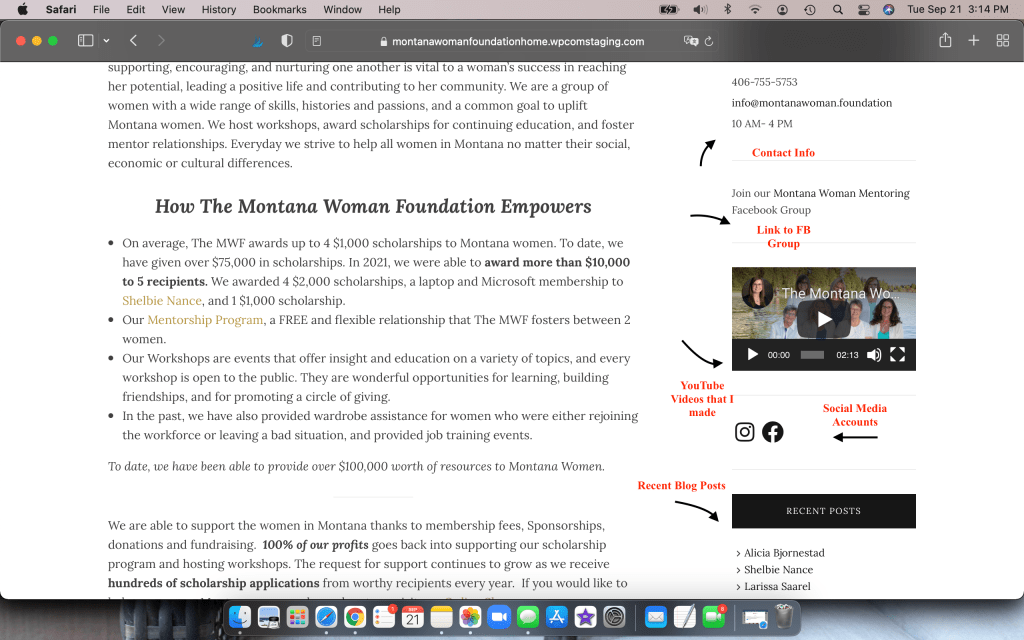
- Search Bar
- Contact Info- phone number, address, email
- Social Icons– Pinterest, Instagram, Facebook, LinkedIn
- Relevant Images and Videos
- Videos that describe your business, organization
- Images of you/your business
- Logos for Affiliate Marketing or Sponsors
- YOUR logo
- Top Posts– some posts might be more popular than others- don’t let your Recent Posts bury them!
- Recent Posts
- Your blog Categories– organize things for your readers!
- Popup HTML– I use MailChimp for my email marketing tool and stick the HTML as a widget for it to activate
- Custom HTML– affiliate logos, advertisements, favorite products that you wish to promote
- Recent Instagram Posts– some Themes support this widget and show website viewers whatever Instagram account you want to share.
- General Text Boxes
- Introduce yourself with a brief description and a photo of yourself
- Links to website pages like a Facebook Group, online store special, or PDF download
Widgets and Plugins in Your Website Designing Process
So there is my list of the Plugins and Widgets that I use when I am designing a website/sometimes use. Why is this part of my website designing phase? Well, that is because a bulk of this information has to with the visual and interactive experience of your website viewer and future customer. It is all complementary material for your visitors to absorb. Visual Rhetoric/Visual Content is very important. Read more about Types of Visual Content and Why Create Visual Content? here.
Be careful of using too many widget- you don’t want your website to look cluttered.
 Katherine MC Johnson
[…] Choosing Widgets and Plugins […]
LikeLike
[…] Choosing Widgets and Plugins […]
LikeLike