
Did you ever ask yourself what type of visual content you want to add to your website? The first time I wrote about visual content, I created an in-depth article centered on creating videos and PowerPoints/Slides. But there are more ways than a video that can create dynamics on a webpage. I have since realized that there are two kinds of visual content: 1. content that supplements or replaces text (the kind I already realized and wrote about previously), and 2. content that disrupts text.
Disclosure: There are affiliate links within this post. If you choose to purchase a product using the links in this website, I may earn a commission at no additional cost to you. Thank you for supporting my business.
Visual Content That Disrupts Text
The visual content that disrupts the overall content in a blog post or page is something that works well for the layout of your page/post while also encouraging readers’ participation such as providing their email address, reviewing a Pinterest board; or giving you the opportunity to earn an income.
Embedded Links
Embedded links for accounts like Pinterest and Instagram/Facebook posts/profiles/Reels are great ways to either promote other creators’ content, or keep them in the loop with your own content/resources. They also double as external links when you optimize your webpage.
Email Opt-in Forms
Opt-in sections within a page or blog post temporarily stop a reader and give the opportunity to submit their email for various goods. In the digital world, emails are a form of currency.
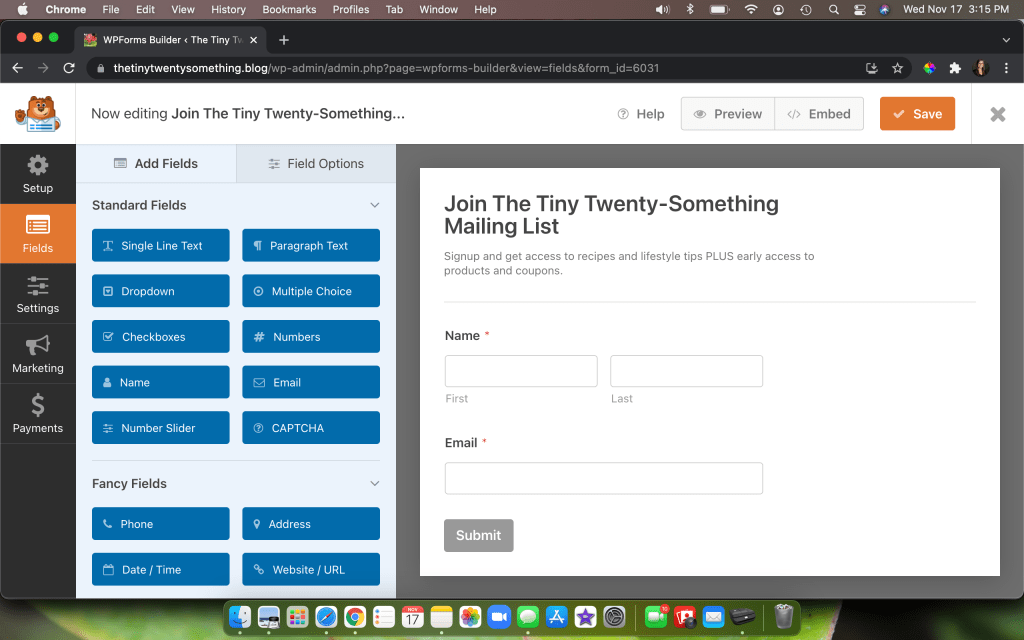
I use WPForms for an email-opt in block in to break up pieces of my blog posts or pages. WPForms is an easy form builder that you can use to collect emails, answer questionnaires/surveys so you can make your content better, and to offer your audience access to exclusive content like resource libraries, print outs, coupons, etc.
Additional Perks for WPForms
- Monthly Giveaways– Every month, WPForms hosts giveaways for its customers. You can win things like headphones, Apple air pods- even I won a PS4 Slim in September 2021!
- Resource Library-There is a giant resource library full of articles and videos to help you with any confusion or need to set up a form, add your license key to your website, etc.
The Button Block for Visual Content
Break up your written content with visual redirects. It’s a great way to add links without making your text perpetually hyperlinked. Lists are also a great way to break up your website design and layout.
Ad Blocks
In order to make an income for yourself, you can place ad blocks in strategic locations within your blog posts or pages. I recommend that you refrain from posting ads in pages like Services and About Us, and keep it to the blog. I have a Premium plan for this website, and a Business plan for my other blog. The Business plans allows for plugins like Google Ads to place ads where it is best according to their analyzing information. With WordPress ads, you have to add the blocks yourself- which I sometimes prefer so that you can control the presentation of the ads. You can even use HTML codes as affiliate advertising (read more below!).
HTML Codes
Insert HTML codes to make content stand out or give accurate representations of your favorite products. Sometimes I don’t want my blog post text to just be hyperlinks leading to my favorite Amazon or Thrive Market products, so I use pre-written HTML codes. Then the codes show up as a usual advertisement (therefore a visual) or they look like graphics like the Tailwind code below. If you become a little more tech-savvy, you can even adjust certain parts of the HTML code such as dimensions and alignment of the block. For example- the below Tailwind ad is an affiliate HTML code. And it was originally twice as large. Sample portion of the HTML block in case some of you readers are unfamilliar: “c=”https://imp.pxf.io/i“
Images
I can’t write a blog post about the two kinds of visual content without including the most obvious: images. Images supplement your information and optimize your content- especially when including alt text relevant to your keyword/phrase. Here are some ideas for images:
- Screenshot examples of you using a specific product (as I included above when I wrote about WPForms)
- Infographics
- Pinterest ready graphics
- Images of you using a product
- Step-by-step photos for a recipe
- Images of you at the travel destination or you having packed up your clothes, or what you wore on your trip
Outline Formating to Displace Visual Content
Using Headings at various levels breaks up your post/page and optimizes your content for search engines- especially when you combine heading titles with your keyword/phrase. This is also a form of desktop management – a responsibility for all writers that requires you to manage the content for the readers so that they can better compartmentalize the information.
Separators also break up content and can work as great indicators of shifting in content topics. ⬆️
Visual Content That Replaces Text
Visual content that replaces or supplements text include powerpoint, videos, and infographics. What you see is just as important as what you read! They’re creative ways to convey your message with little reading.
Videos/PowerPoints
I would say that videos are perhaps the most time consuming way of presenting visual rhetoric. Why? Because a lot of storyboarding takes place when creating a video and making sure certain elements line up correctly, or ensuring that adequate time is allowed for reading the text on the screen. For an in-depth lesson about replacing text with a video, read my article: Why Create Visual Content?
Reels
Reels are an excellent example of what it means to replace text and lengthy messages with shorter messages and little to no words! For those of you unfamiliar with the term, Reels are short videos on Facebook and Instagram, and TikTok. They are teeny tiny (like not even 30 seconds) and usually follow trending audio like “7 summers ago” or “Before/After” audio clips. In editing, you stitch images or video clips and create a short video to go with audio of your choosing and the goal is to make the reel as short as possible and reasonable. This is an excellent way to go down the filter bubble rabbit hole.
This reel is from my other blog, visitors have the option to play it on this website.
Infographics
Infographics are graphics with information! So straight forward, but you need to make these condensed or use charts, or characters or shapes like circles, squares, and arrows to direct readers to your message- emojis are even an optional tool- anything to replace written content. But remember: keep your words short or minimal.

Tables and Charts
Sometimes it’s really easy to throw in a table block to condense information and make the information conveniently accessible to readers. Keep in mind, though, that the text within a table does not count towards overall word count and will not assist you in maximizing your SEO.
| Content That Disrupts | Content that Replaces |
|---|---|
| Embedded Links like Pinterest Boards and Instagram URL links | Videos/PowerPoints |
| Email Op-in Forms/Forms | Reels |
| Button Blocks | Infographics |
| Separators | Tables |
| Ad Blocks | |
| HTML Codes | |
| Images |
Final Thoughts on the Types of Visual Content
These are the eleven types of visual content that I can think of right now, but I am sure that there are way more than I can’t even think of as I am writing this post. What are your favorite types of visual content? What do you like to use the most often?
 Katherine MC Johnson
[…] for your visitors to absorb. Visual Rhetoric/Visual Content is very important. Read more about Types of Visual Content and Why Create Visual Content? […]
LikeLike